
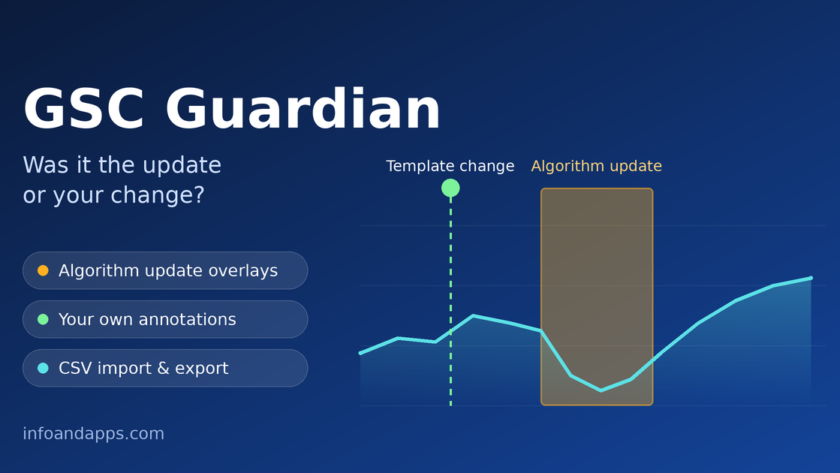
Monday morning. You open Search Console and your clicks line has fallen off a cliff. Your stomach drops, and the questions start. Did Google roll out an update? Or was it the template change you shipped last Thursday? Without a record of both, you’re guessing. GSC Guardian is a Chrome extension built to close that gap, by putting update dates and your own notes on the same chart.
Key takeaways
- GSC Guardian is a Chrome extension that adds algorithm update overlays and annotations to Search Console charts.
- It supports CSV import, and export to CSV or Google Sheets.
- Search Console now has its own custom annotations, so the extension’s edge is the update overlay and the bulk tools.
- It isn’t an AI tool. The product page lists no AI features.
What is GSC Guardian?
GSC Guardian is a Chrome extension from Node & Link, the research and community-app site run by Darwin Santos. It adds context to Google Search Console’s performance charts. It overlays known Google algorithm updates and lets you add timestamped notes, so changes and results sit on one timeline. You install it from the Chrome Web Store and use it on Search Console properties you already work with.
What does GSC Guardian do?
Three things, all inside Search Console.
Algorithm update overlays
The extension draws update periods as overlays on your performance graphs, so you can check at a glance whether a traffic change lines up with a known update. Coverage of the tool says the dates come from Google’s Search Status Dashboard, Google’s own record of ranking updates and incidents.
Your own annotations
Add timestamped notes for releases, content changes, migrations or anything else that might move your numbers. You can search your notes and filter them by property, which helps if you manage several sites.
CSV import and export
You can preview a CSV before importing it, which is handy for bringing in a backlog of past changes. Export your annotations to CSV or Google Sheets when you need to share them with a client or teammate.
Doesn’t Search Console already have annotations?
Partly, yes. Google launched custom annotations in the performance report on November 17, 2025. They’re notes you write yourself to mark events on your property, such as a launch or a bug fix. That covers the note-taking. What the sources we checked don’t describe is an automatic algorithm-update overlay or the bulk CSV tools.
So if you only need a handful of notes, the built-in feature may be enough. If you manage many sites, want updates drawn on the chart, or need to move notes in bulk, an extension can save you time.
Is GSC Guardian an AI tool?
Not as far as its product page shows. It lists overlays, annotations and CSV tools, with no AI features. Node & Link does link to a separate custom GPT, the GSC Guardian CSV Builder, which helps prepare annotation data inside ChatGPT. The page says its behavior hasn’t been tested, so treat it as an optional extra and check any generated CSV before you import it.
How to get started
- Review the listing. Open the official Chrome Web Store listing and read the permissions and the extension privacy policy.
- Open Search Console. Pick a property you already work with.
- Add context. Look at the update overlays, then log your recent changes as annotations.
A good first move: log the last three months of changes, so your next dip has history behind it.
What to keep in mind
- Timing isn’t proof. An overlay shows when an update ran, not that it caused your drop.
- Other things move traffic too. Seasonality, tracking changes and technical issues can all look like an update.
- Your Search Console data is sensitive. As with any extension, check permissions and the privacy policy before you install.
Transparency note: this article is based on the product page, the Chrome Web Store listing and public coverage. We haven’t tested the extension hands-on.
Want more small utilities for web and marketing work? Browse our free marketing tools. And if you’re tidying up your technical SEO checks too, our guide to Google’s rich results and structured data testing tools is a good next read.
GSC Guardian extension FAQs
What is GSC Guardian?
GSC Guardian is a Chrome extension from Node & Link that adds algorithm update overlays and your own annotations to Google Search Console charts. It also supports CSV import, and export to CSV or Google Sheets. It’s listed as a community app and installs from the Chrome Web Store.
Does Google Search Console have built-in annotations?
Yes. Google launched custom annotations for performance reports on November 17, 2025. They let you add your own notes for events on your property. GSC Guardian adds an algorithm update overlay and bulk import and export tools, so which one fits depends on your workflow.
Where does GSC Guardian get its algorithm update data?
Coverage of the extension says it shows updates from Google’s Search Status Dashboard. Sources and refresh timing can change, so check the current Chrome Web Store listing or ask the developer before you rely on it for client reports.
Can I import and export annotations?
Yes. You can preview a CSV before importing it, and export your annotations to CSV or Google Sheets. Annotations can also be searched and filtered by property, which helps when you manage several sites.
Is GSC Guardian safe to install?
No extension is risk-free, so check before you install. Read the permissions and the extension privacy policy, and review the publisher on the Chrome Web Store. The listing says the extension was independently reviewed for security, but that is the developer’s own statement, so verify it yourself.